Most review request emails get ignored. The timing is off, the email gets buried, or customers just don't feel compelled to act.
But there's a moment when review requests actually work: when a customer places their second order.
Think about what that second order means. They received their first order, used the product, liked it enough to come back, and are now actively engaged with your brand again. That's the perfect time to ask.
Here's why the second order strategy works better than email:
The typical approach is to send an email a few days after delivery asking for a review. The problems:
Too early: Customer hasn't used the product yet. They can't write a meaningful review.
Too late: Customer has moved on. The excitement of receiving the package has faded.
Low visibility: Email open rates hover around 25%. Most review requests are never seen.
Wrong context: Reading email is passive. The customer isn't in "action mode."
Compare that to a review request card in the package of their second order:
Right timing: They've clearly used and enjoyed the first order.
High visibility: 100% of customers open their packages.
Action context: They're already engaged with your brand.
Setting this up in Insertr takes about 5 minutes.
In your Shopify admin, create a product for your review request card:
The card itself should be simple:
In Insertr, create a new rule with these settings:
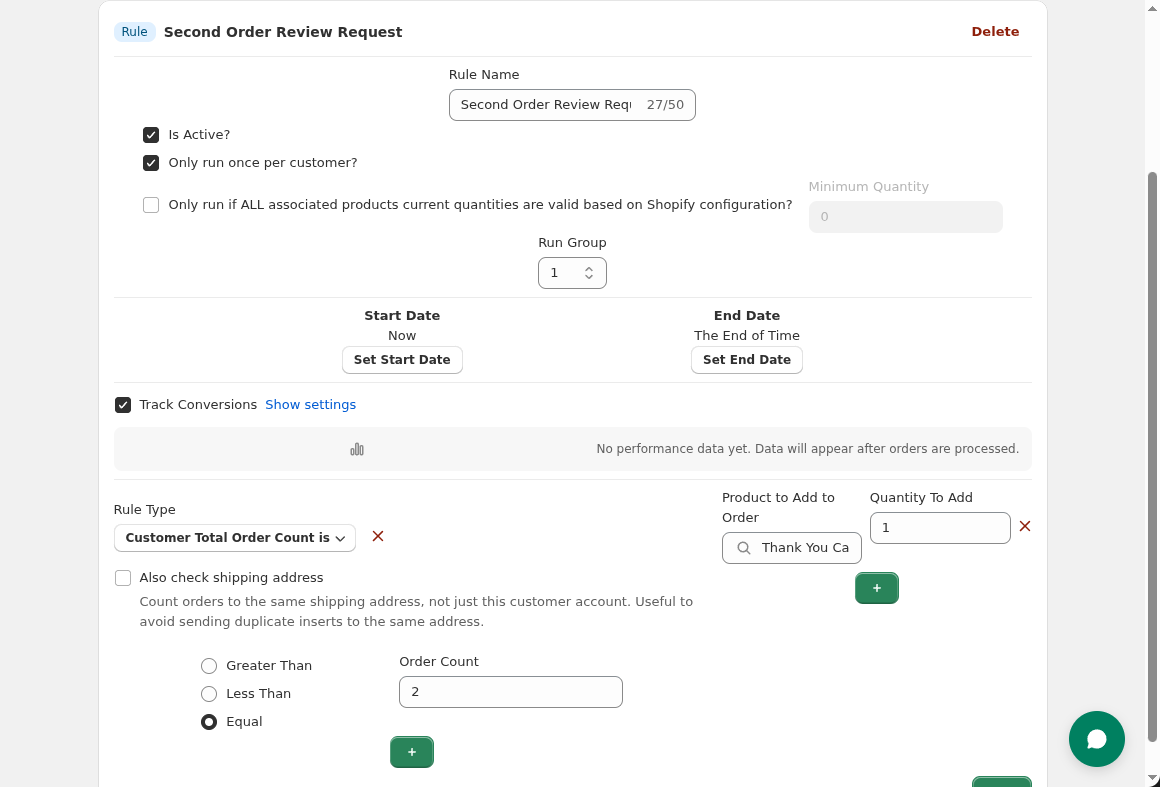 Set order count to "Equal to 2" to target second-time buyers specifically.
If you want to measure whether recipients actually leave reviews:
Note: Tracking review submissions directly requires integration with your review app. Insertr tracks repeat purchases, which correlates with engagement.
Keep it simple. One clear call-to-action.
Friendly approach:
"Enjoying [Product Name]? We'd love to hear about it. Scan to leave a quick review—it takes 30 seconds and helps other customers like you."
With incentive:
"Leave a review, get $5 off your next order. Scan the QR code, share your experience, and we'll send you a discount code."
Direct approach:
"Your review helps us improve. Scan to share your thoughts."
Yes if:
No if:
Many platforms like Loox and Judge.me allow incentives for leaving a review, but check their specific guidelines.
You might think: why not include the review card in the first order?
Three reasons:
On first order, the customer hasn't used the product. Any review would be about the unboxing experience or first impressions—not the actual product quality. These reviews are less valuable to future customers.
A first-time buyer might have issues with the product. Asking for a review before they've decided if they like it is premature. Worse, it might prompt a negative review from someone who just needed time.
When someone buys again, they've implicitly said "I liked the first one." You're asking happy customers for reviews. This naturally skews toward positive feedback without any manipulation—you're just timing the ask better.
You don't have to choose between physical cards and email. Use both strategically:
Email for first order: Send a review request email 7-14 days after delivery. Catches customers who won't order again but might still leave a review.
Physical card for second order: Catches your best customers at the moment of highest engagement.
The audiences barely overlap. Email catches one-time buyers. The card catches repeat buyers. Together, you maximize review collection.
If your review app has an API or export, compare:
Use Insertr's conversion tracking to measure:
High engagement on both metrics correlates with review submission, even if you can't track reviews directly.
If you include an incentive code on the card, enable discount code tracking in Insertr:
Q: Won't this annoy customers?
A: No. The card is included with something they ordered. It's not an interruption like email. And you're asking at the moment they've shown satisfaction by ordering again.
Q: What if someone orders a second time but didn't like the first order?
A: Rare. People don't usually reorder products they disliked. But if you're worried, add a condition: "Customer Tag does not contain 'support-issue'" to exclude customers who've contacted support.
Q: Can I combine this with email review requests?
A: Yes. Email targets first-order customers. The card targets second-order customers. Different audiences, no overlap.
Q: What about customers who order more than twice?
A: "Equal to 2" ensures the card only goes in the second order, not the third, fourth, etc. You could create a separate rule for order 5 or 10 if you want milestone review requests.
Q: Should I target a specific product?
A: Usually not necessary. The second order proves satisfaction with whatever they bought first. But if you sell very different product categories, you could add a "Previously Ordered Product Tag = [category]" condition.
The second order review strategy works because you're asking the right people at the right time in the right place.
Set up the rule in Insertr, add your review card, and let automation do the work.
Install Insertr to start collecting more reviews with the second order strategy.
Last updated: January 2026 | Author: Tom McGee, Founder of Insertr
About the Author: Tom McGee is the founder of Insertr and a former Senior Software Engineer at both Shopify and ShipBob. He founded Cool Steeper Club, a curated cold brew tea subscription box, where he discovered that timing review requests to repeat orders dramatically increased review submission rates.