Every Shopify merchant sends marketing emails. But here's the thing: only about 25% of those emails ever get opened. Meanwhile, 100% of your customers open their packages.
That's the opportunity package inserts unlock. A thank you card, free sample, or promotional insert that arrives with their order has a guaranteed audience—the customer who just bought from you.
This guide walks through setting up automated package inserts in your Shopify store using Insertr. By the end, you'll have a working "First Order Thank You" rule that automatically adds a thank you card to every new customer's order.
First, create the physical item you want to add to orders. This could be a thank you card, product sample, promotional flyer, or any other insert.
In Shopify Admin:
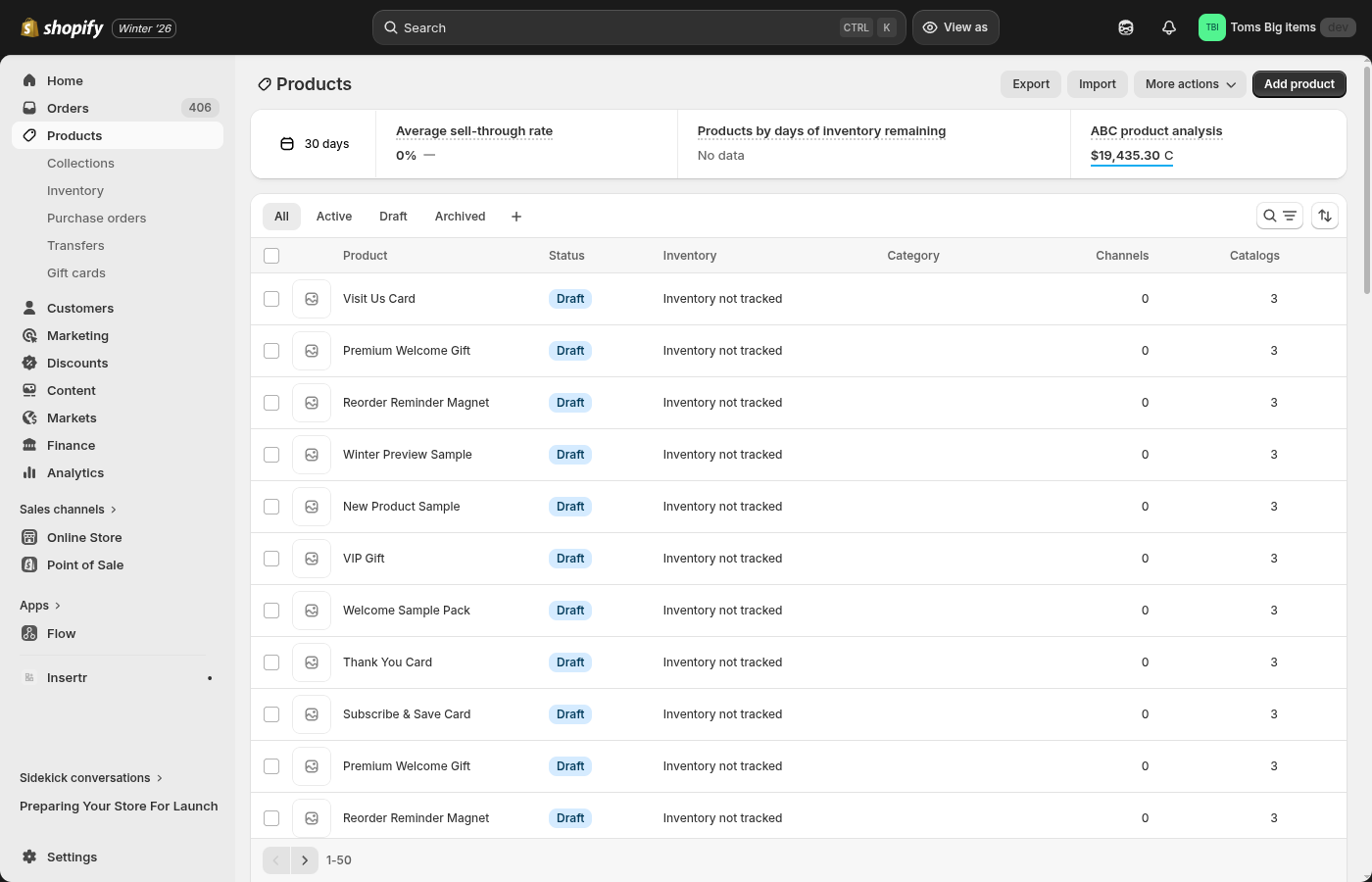 Create your insert as a regular Shopify product with a clear SKU your warehouse can identify.
Why set price to $0? Insertr adds inserts as line items with a 100% discount. Setting the base price to $0 keeps things simple, but you can also price it normally—the discount handles the rest.
You probably don't want your thank you card showing up in your online store for customers to "purchase." Here's how to hide it:
Tip: Set the product's status to "Draft" or manage its sales channels so customers can't accidentally buy it from your storefront.
The insert product is now hidden from shoppers but still available for Insertr to add to orders.
Now comes the fun part—telling Insertr when to add your insert.
 The Rules page shows all your insert rules. Click Create Rule to add your first one.
Let's create a "First Order Thank You" rule that adds a thank you card to every new customer's first order.
Rule Settings:
| Field | Value | Why |
|---|---|---|
| Rule Name | First Order Thank You | Descriptive name you'll see in the rules list |
| Active | On | Rule starts working immediately |
| Only run once per customer | Checked | Prevents repeat thank you cards on future orders |
| Product to Add | Thank You Card | Select the product you created in Step 1 |
Conditions:
This targets customers on their very first order (the count includes the current order, so "1" means this is their first).
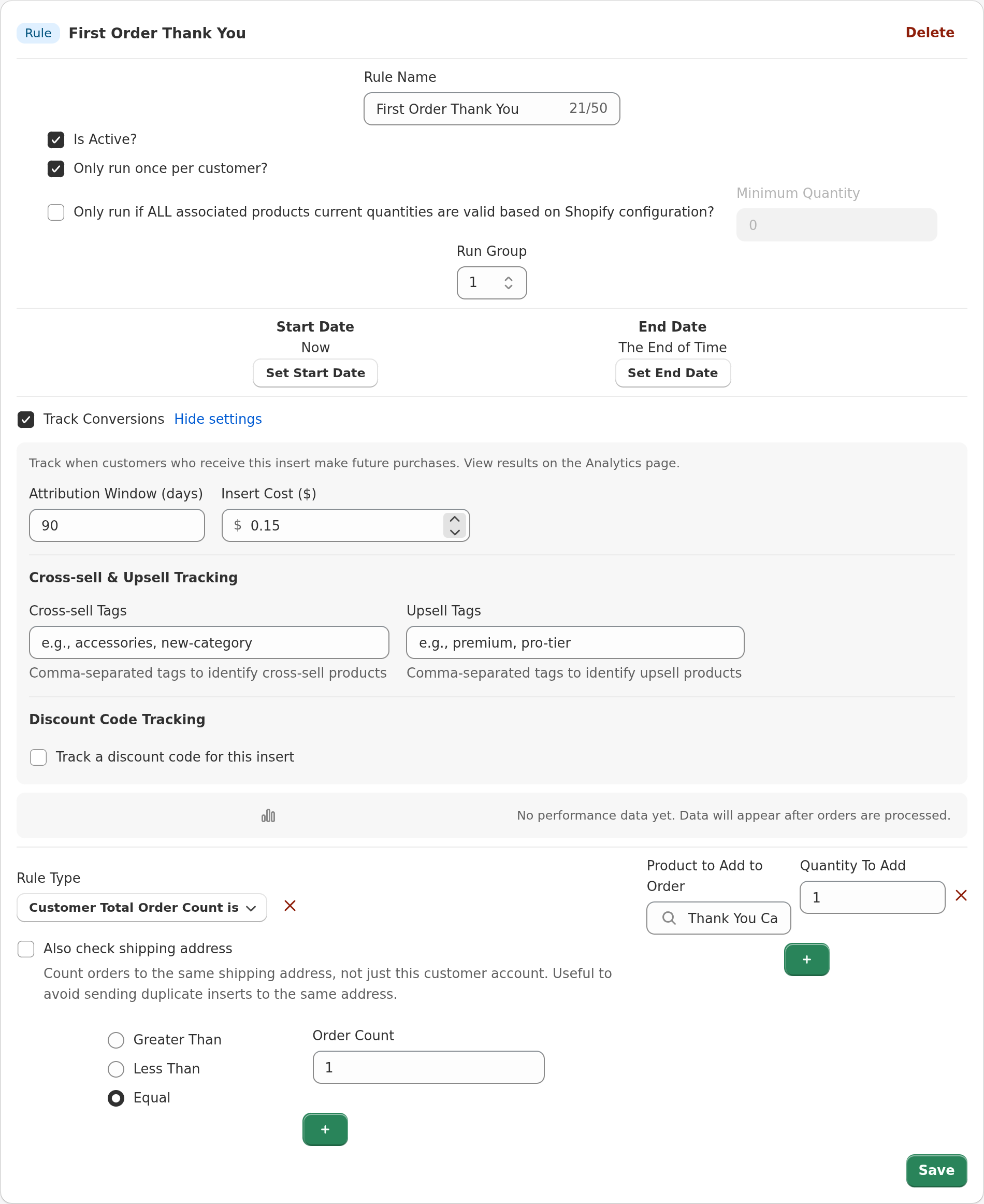 A complete "First Order Thank You" rule with the order count condition set to 1.
Click Save Rule when you're done.
Before going live, verify everything works with a test order.
Within seconds, Insertr processes the order and adds your insert.
Check that the insert appeared correctly:
 The order timeline shows when Insertr processed the order and added the insert.
The thank you card appears as a $0 line item alongside the customer's purchase.
That's it! Your thank you card will now be automatically added to every first order. When your warehouse receives the order, they'll see "Thank You Card" as a line item and pick it just like any other product.
One of Insertr's key benefits is that it requires no special integration with your fulfillment provider.
Here's the flow:
Because inserts are regular line items with SKUs, any fulfillment system that reads Shopify orders will handle them automatically. No custom logic, no special instructions, no per-order fees.
This works with:
The "First Order Thank You" rule is just the beginning. Insertr supports 17+ rule types you can combine for targeted marketing:
| Use Case | Rule Type | Example |
|---|---|---|
| VIP rewards | Total Spend > $500 | Premium gift for high-value customers |
| Product sampling | Product Tag = "coffee" | Tea sample to coffee buyers |
| Subscription upsell | Customer Has Subscription = No | "Subscribe & Save" card |
| Location-specific | Shipping Country = France | French-language insert |
| Order value threshold | Order Value > $100 | Free gift with large orders |
You can also combine conditions with AND/OR logic. For example: "First order AND order value > $50" to send premium welcome gifts only to customers who spend above a threshold.
How do you know if your inserts are working? Insertr includes built-in conversion tracking:
This tells you which inserts drive repeat purchases—so you can do more of what works.
Q: Will customers see the insert in their order confirmation email? A: Yes, the insert appears as a $0 line item. Most customers don't mind (or even notice), but you can customize your email templates to hide $0 items if preferred.
Q: What if I run out of insert inventory? A: If you're tracking inventory on your insert product, Insertr will stop adding it when stock hits zero. You can also pause rules manually anytime.
Q: Can I A/B test different inserts? A: Yes! Create an A/B test instead of a regular rule. Split traffic between variants (e.g., 50% thank you card, 50% discount card) and track which performs better.
Q: Does this work with draft orders? A: Yes, Insertr processes orders regardless of how they're created—checkout, draft orders, POS, or through the Orders API.
Ready to turn your packages into a marketing channel?
Your orders are already being delivered. Make each one a marketing opportunity.
Last updated: January 2026 | Author: Tom McGee, Founder of Insertr
About the Author: Tom McGee is the founder of Insertr and a former Senior Software Engineer at both Shopify and ShipBob. At ShipBob, he spent nearly 4 years building warehouse management software for packing flows—giving him firsthand experience with how 3PLs handle physical inserts. He also founded Cool Steeper Club, a curated cold brew tea subscription box, where he used package inserts to drive subscriber retention.